
运动轴点动 (MAJ)
此信息适用于
CompactLogix
5370、ControlLogix
5570、Compact GuardLogix
5370、GuardLogix
5570、Compact GuardLogix
5380、CompactLogix
5380、ControlLogix
5580、GuardLogix
5580 和 ControlLogix 5590 控制器。运动轴点动 (MAJ) 指令用于以恒定速度移动轴,直至向轴发出停止命令。
架构 | 标准 | 安全 |
|---|---|---|
CompactLogix 5370、ControlLogix 5570、Compact GuardLogix 5370 和 GuardLogix 5570 控制器 | 是 | 否 |
CompactLogix 5380、ControlLogix 5580、Compact GuardLogix 5380、GuardLogix 5580 和 ControlLogix 5590 控制器 | 是 | 否 |
可用语言
梯形图
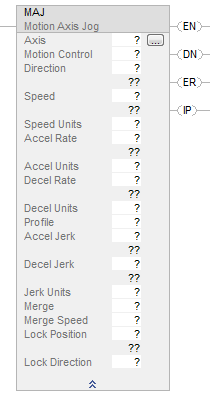
功能块
此指令不可用于功能块中。
结构化文本
MAJ(Axis,MotionControl, Direction,Speed, SpeedUnits, AccelRate, AccelUnits, DecelRate, DecelUnits, Profile,
AccelJerk, DecelJerk, JerkUnits, Merge, MergeSpeed LockPosition, LockDirection);
操作数
操作数 | 类型
小贴士:
AXIS_CONSUMED 仅受
Compact GuardLogix 5580 和 CompactLogix 5380 控制器支持。 | 类型
小贴士:
只有
ControlLogix 5570 和 GuardLogix 5570 控制器支持 AXIS_GENERIC。 | 格式 | 说明 | |
|---|---|---|---|---|---|
Axis | AXIS_CIP_DRIVE AXIS_VIRTUAL | AXIS_CIP_DRIVE AXIS_VIRTUAL AXIS_GENERIC_DRIVE AXIS_SERVO AXIS_SERVO_DRIVE | 标签 | 要点动的轴的名称。对于支持 REF_TO 运动数据类型的控制器,支持的轴操作数类型可以替换为等效的 REF_TO 类型。 | |
Motion Control | MOTION_INSTRUCTION | MOTION_INSTRUCTION | 标签 | 指令的控制标签。 | |
Direction | DINT | DINT | 立即数 | 对于此点动方向 | Enter |
Forward | 0 | ||||
Reverse | 1 | ||||
Speed | REAL | REAL | 立即数或标签 | 轴的运动速度(速度单位)。 | |
Speed Units | DINT | DINT | 立即数 | 使用的速度单位。
| |
Accel Rate | REAL | REAL | 立即数或标签 | 轴的加速度(加速度单位)。 | |
Accel Units | DINT | DINT | 立即数 | 使用的加速度单位。
| |
Decel Rate | REAL | REAL | 立即数或标签 | 轴的减速度(减速度单位)。 | |
Decel Units | DINT | DINT | 立即数 | 使用的减速度单位。
| |
Profile | DINT | DINT | 立即数 | 选择运行点动的速度曲线:
| |
Accel Jerk | REAL | REAL | 立即数或标签 | 必须 输入操作数加速急动度和减速急动度操作数的值。仅当将曲线操作数配置为 S 曲线时,此指令才会使用这些值。
使用以下值开始操作。
按以下急动度单位输入急动度。 0 = 单位/秒 3 1 = 最大值百分比 2 = 时间百分比(使用该值开始操作) 4 = 单位/主轴单位 3 6 = 时间主轴驱动百分比 | |
Decel Jerk | REAL | REAL | 立即数或标签 | ||
Jerk Units | DINT | DINT | 立即数 | ||
Merge | DINT | DINT | 立即数 | 是否要将当前所有轴运动转换为完全由该指令控制的纯点动操作,而不考虑当前正在执行的运动指令?
| |
Merge Speed | DINT | DINT | 立即数 | 启用合并后,采用以下哪个点动速度?
| |
Lock Position | REAL | REAL | 立即数或标签 | 这是主轴上的位置,当在从轴上启动运动后,从轴将从该位置开始跟随主轴运动。 有关详细信息,请参见下文的“结构”部分。 | |
Lock Direction | UINT32 | UINT32 | 立即数或标签 | 指定锁定位置的使用条件。 有关详细信息,请参见下文的“结构”部分。 | |
结构化文本
此操作数 | 可选择以下输入方式 | |
|---|---|---|
输入文本 | Or Enter as a Number | |
轴 | 无枚举值 | Tag |
MotionControl | 无枚举值 | Tag |
方向 | 无枚举值 | Immediate |
速度 | 无枚举值 | Immediate or Tag |
SpeedUnits | units per sec 最大值的百分比 unitspermasterunit | 0 1 4 |
AccelRate | ||
AccelUnits | units per sec 2 最大值的百分比 unitspermasterunit 2 | 0 1 4 |
DecelRate | ||
DecelUnits | units per sec 2 最大值的百分比 unitspermasterunit 2 | 0 1 4 |
Profile | 梯形曲线 S 曲线 | 0 1 |
AccelJerk | 无枚举值 | Immediate or Tag You must always enter a value for the Accel and Decel Jerk operands. This instruction only uses the values if the Profile is configured asS-curve. Use these values to get started.
|
DecelJerk | 无枚举值 | |
Jerk Units | units per sec 3 %ofmaximum %oftime unitspermasterunit 3 %oftimemasterdriven | 0 1 2 (use this value to get started) 4 6 |
Merge | disabled enabled | 0 1 |
Merge Speed | programmed current | 0 1 |
锁定位置 | 无枚举值 | Immediate or Tag |
锁定方向 | 无 immediateforwardonly immediatereverseonly positionforward positionreverse | 0 1 2 3 4 |
有关结构化文本中表达式语法的详细信息,请参阅结构化文本语法。
MOTION_INSTRUCTION 结构
要查看是否出现以下情况 | 检查该位是否置位 | 数据类型 | 备注 |
|---|---|---|---|
是否通过假到真跳变使指令开始执行。 | EN | BOOL | EN 位保持置位,直到过程完成且梯级变为假。 |
是否已成功启动点动。 | DN | BOOL | |
是否发生错误。 | ER | BOOL | |
轴是否正在点动。 | IP | BOOL | 以下动作会停止该点动并将 IP 位清零:
|
说明
MAJ 指令用于在任何位置以恒定速度移动轴。
编程原则
重要提示:
如果通过任意方法动态更改运动参数,即通过更改运动动力学参数 [“运动变化动态”(MCD) 指令或“运动协调变化动态”(MCCD)] 或在上一条指令完成前启动新指令,请注意存在速度或结束位置过冲的风险。
如果在运动减速或接近减速点时最大减速度减小,则梯形速度曲线可能会过冲。
而在下列情况下,S 形速度曲线可能会过冲:
- 如果在运动减速或接近减速点时最大减速度减小;或者
- 最大加速急动度减小,且轴正在加速。但要记住,如果急动度以时间百分比的形式指定,则可间接更改。
有关更多信息,请参见“排查轴运动故障”部分。
指导原则 | 详细信息 | ||
|---|---|---|---|
在梯形图中,每次要执行该指令时,应切换梯级条件。 | 此为跳变指令: 在梯形图中,每次要执行该指令时,应将梯级输入条件由清零切换为置位。 | ||
在结构化文本中,为指令设置限定条件,以便仅在出现跳变时才执行此指令。 | 在结构化文本中,指令会在每次被扫描时执行。 调整指令,使其仅在跳变时执行。可使用下列方法之一:
有关更多信息,请参见“结构化文本语法”部分。 | ||
针对 S 曲线使用急动度操作数。 | 指令使用 S 曲线时,应使用急动度操作数。 无论曲线轨迹如何,必须填写急动度操作数。 | ||
为简化急动度的编程和调谐,应使用“时间的百分比”单位。 | 要简化急动度的编程和调谐,应输入为加速或减速时间的百分比。 有关详细信息,请参见“调谐 S 曲线”部分。 | ||
使用合并操作数取消其他指令的运动。 | 如何处理已在进行的运动? | ||
如果希望 | And You Want To | Then Set | |
在已在进行的运动中增加点动 |  | Merge = Disabled Merge Speed = Programmed The instruction ignores Merge Speed but you must fill it in anyway. | |
通过其他指令结束运动,而仅执行点动 | Jog at the speed that you set in this instruction | Merge = Enabled Merge Speed = Programmed | |
Jog at the speed that the axis is already moving | Merge = Enabled Merge Speed = Current The instruction ignores the value that you put in the Speed operand. | ||
在轴点动期间,应谨慎启动另一个点动操作。 | 如果在轴点动期间启动新的 MAJ 指令,将导致:
MAJ 指令使用 S 曲线时会出现此情况。新的 MAJ 指令会取消旧的 MAJ 指令。轴将使用新指令的速度、加速度、减速度和急动度。 有关详细信息,请参见“排查轴运动故障”部分。 | ||
使用 MAS 指令停止点动。 | |||
使用 MCD 指令在点动期间更改速度。 | |||
在与坐标系统相关的任何轴上使用 MAJ(合并 = 启用),并且正在其上运行协调运动指令时,使用坐标系统的最大减速度停止其余轴。如果坐标系统中包含姿态轴,则使用坐标系统的最大姿态减速度停止其余 Rx、Ry 或 Rz 轴。
结构
有关通过主轴驱动速度控制 (Master Driven Speed Control, MDSC) 功能可用于 MAJ 指令的输入和输出参数,请参见“单轴运动指令的输入和输出参数结构”部分。在任意参数激活之前,必须执行 MDAC 指令,并且该指令必须激活(IP 位置位)。
影响数学状态标志
否
严重/轻微故障
没有特定于此指令的故障。如果将未初始化的引用或类型不正确的引用传递给轴操作数,则可能发生严重故障。有关操作数相关的故障,请参阅 通用属性。
执行
梯形图
条件/状态 | 执行的操作 |
|---|---|
预扫描 | .EN、.DN、.ER 和 .IP 位设置为假。 |
梯级输入条件为假 | 如果 .DN 或 .ER 位为真,则 .EN 位设置为假。 |
梯级输入条件为真 | .EN 位设置为真,指令执行。 |
后扫描 | 不适用 |
结构化文本
条件/状态 | 执行的操作 |
|---|---|
预扫描 | 请参见“梯形图”表中的“预扫描”行 |
正常执行 | 请参见“梯形图”表中的“梯级输入条件为假”行,然后参见“梯级输入条件为真”行。 |
后扫描 | 请参见“梯形图”表中的“后扫描”行。 |
错误代码
有关运动指令,请参阅 运动错误代码 .ERR。
运行错误状况
如果速度单位为秒或主轴单位,则从轴必须在静止状态开始运动。如果启动速度单位 = 秒或主轴单位的 MAJ 指令时,另一 MAJ 指令正在执行(合并或替代模式),则会发生此情况。
扩展错误代码
使用扩展错误代码 (.EXERR) 可获取有关错误的更多信息。
如果 ERR 为 | 且 EXERR | 则 | ||
|---|---|---|---|---|
原因 | 纠正措施 | |||
13 | 变化 | 操作数超出其范围。 | The EXERR is the number of the operand that is out of range. The first operand is 0. For example, if EXERR = 3, then check the Speed. | |
EXERR | MAS 操作数 | |||
0 | 轴 | |||
1 | 运动控制 | |||
2 | 方向 | |||
3 | 速度 | |||
5 | Accel Rate | |||
7 | Decel Rate | |||
15 | -1 | 坐标系统的最大减速度为 0。 | Go to the Properties for the coordinate system axis and set a Maximum Deceleration. | |
0 或更大 | 坐标系统中某个轴的最大减速度为 0。 |
| ||
状态位变化
运动指令预定义的数据类型状态位
请参见“MDAC 激活时运动指令(MAM、MATC、MAJ)的状态位”部分。
MAJ 指令状态位变化
位名称 | 含义 | |
|---|---|---|
MotionStatus | 轴的运动状态位。 | |
位号 | 含义 | |
AccelStatus | 0 | The axis is not accelerating (FALSE state). |
DecelStatus | 1 | The axis is not decelerating (FALSE state). |
MoveStatus | 2 | The axis is not moving (FALSE state). |
JogStatus | 3 | The axis is not jogging (FALSE state). |
GearingStatus | 4 | The axis is not gearing (FALSE state). |
HomingStatus | 5 | The axis is not homing (FALSE state). |
StoppingStatus | 6 | The axis is stopping (TRUE state). |
AxisHomedStatus | 7 | The axis is not homed (FALSE state). |
PositionCamStatus | 8 | The axis is not position camming (FALSE state). |
TimeCamStatus | 9 | The axis is not time camming (FALSE state). |
PositionCamPendingStatus | 10 | The axis does not have a Position Cam Pending (FALSE state). |
TimeCamPendingStatus | 11 | The axis does not have a Time Cam Pending (FALSE state). |
GearingLockStatus | 12 | The axis is not in a Gear Locked condition (FALSE state). |
PositionCamLockStatus | 13 | The axis is not in a Position Cam Locked condition (FALSE state). |
TimeCamLockStatus | 14 | The axis is not in a Time Cam Locked condition (FALSE state). |
MasterOffsetMoveStatus | 15 | The axis is offset (TRUE state). |
CoordinatedMotionStatus | 16 | Sets when the MDAC instruction executes (TRUE state). Clears when the instruction completes (FALSE state). |
TransformStateStatus | 17 | The axis is part of an active transform (TRUE state). |
ControlledByTransformStatus | 18 | The axis is moving because of a transform (TRUE state). |
DirectVelocityControlStatus | 19 | The axis is not under Direct Velocity Control (FALSE state). |
DirectTorqueControlStatus | 20 | The axis is not under Direct Torque Control (FALSE state). |
JogLockStatus | 24 | MAJ is Locked to Master in MDSC Mode (TRUE state). The bit is cleared when a MGS, MGSD, MAS, or MASD is executed. If either the Slave or Master axis (or both) is paused by changing its speed to 0, then the JogLockStatus bit stays set. Master Driven Mode The bit is set when the Lock Direction request is satisfied. The bit is not used when the enumeration is NONE. For the enumerations Immediate Forward Only and Immediate Reverse Only, the JogLockStatus bit is set immediately when the MAJ is initiated. For the enumeration Position Forward Only and Position Reverse Only, the bit is set when the Master Axis crosses the Master Lock Position in the specified direction. The JogLockStatus bit is cleared when the Master Axis reverses direction and the Slave Axis stops following the Master Axis. The JogLockStatus bit is set again when the Slave Axis resumes following the Master Axis. Time Driven Mode The bit is not used when the enumeration is NONE. |
MasterOffsetMoveLockStatus | 26 | Master offset Move is Locked to master in MDSC Mode (TRUE state). |
MaximumSpeedExceeded | 27 | Sets when the maximum axis speed that is specified in the axis configuration is exceeded during a move (TRUE state). Clears when the velocity is reduced below the limit (FALSE state). |
MAJ 单轴状态位变化
如果合并操作数 | 则指令更改以下位 | ||
|---|---|---|---|
位名称 | 状态 | 含义 | |
禁用 | JogStatus | TRUE | Axis is Jogging. |
启用 | JogStatus | TRUE | Axis is Jogging. |
MoveStatus | FALSE | Axis is no longer Moving. | |
GearingStatus | FALSE | Axis is no longer Gearing. | |
主轴驱动速度控制 (MDSC) 和运动直接命令支持
运动直接命令无法用在 MDAC 或 MDCC 指令的指令树中。在时间驱动模式下执行 MAJ 之前,必须以支持的编程语言对 MDAC 编程。如果未事先在主轴驱动模式下在 MAM 和 MAJ 中执行 MDAC,将发生运行错误。
“运动直接命令”支持 MAJ 的 MDSC 速度、加速度、减速度和急动度枚举值。
请注意,MAJ 和“运动直接命令”不支持“事件距离”和“计算数据”参数。
主轴驱动速度控制 (MDSC)、CIP 轴手动调谐以及运动发生器
MAJ 不支持“事件距离”和“计算数据”参数。
示例
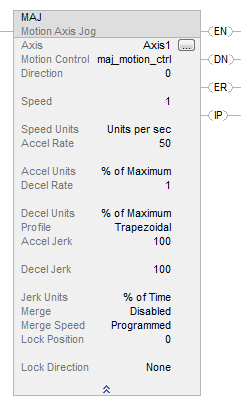
梯形图
提供反馈